About GestureSynth.me
What Is a Gesture Synth? How GestureSynth.me Works
A gesture synth is a digital musical instrument that turns physical movement into sound. Instead of pressing piano keys or moving hardware knobs, a player uses visible hand positions and motion to choose notes, chords and expressive controls. GestureSynth.me brings that idea into a standard web browser: a webcam observes two hands, a local hand-tracking model identifies useful landmarks, and a Web Audio synthesizer responds in real time.
The instrument is free to play and requires no account, download, microphone or MIDI controller. Camera frames are processed on the device for hand tracking rather than uploaded as video. This page explains what a gesture synth is, how it differs from a theremin, what the browser instrument can play and what happens after you select Start.
Play the free gesture synth →- Input
- Webcam hand movement
- Output
- Browser-generated sound
- Modes
- Chords and theremin pitch
- Setup
- Free, no account
What a Gesture Synth Is
A gesture synth combines a motion-sensing input with a sound engine. The sensing layer measures a performer's movement; the mapping layer converts those measurements into musical values; and the synthesis layer creates the sound. A movement can select a scale degree, change chord quality, move an octave, open a filter or control loudness. The important idea is that the gesture is not merely starting a prerecorded clip. It becomes a continuous, playable control for the instrument.
Different gesture synthesizers use different sensors. Some rely on depth cameras, infrared hardware, wearable controllers or specialist instruments. GestureSynth.me uses the webcam that is already built into many laptops and phones. That choice makes the experience easy to try, while the visible on-screen controls explain exactly how each hand shape is being interpreted.
Gesture input changes the physical relationship between player and instrument. Large movements can shape a phrase, two hands can control separate musical dimensions, and a performance can be understood visually as well as heard. At the same time, reliable playing still depends on deliberate shapes, stable lighting and a short period of practice. The goal is not to pretend that every movement is music; it is to provide a small, repeatable vocabulary that a player can learn.
Gesture Synth vs. Theremin
A traditional theremin is an electronic instrument played without physical contact. Two antennas respond to the player's hands: one controls pitch and the other controls volume. Because pitch is continuous, a theremin player must learn precise positions by ear. A gesture synth is a broader category. It can imitate that continuous relationship, but it can also interpret discrete poses, choose fixed notes or chords, and map additional movements to timbre and arrangement controls.
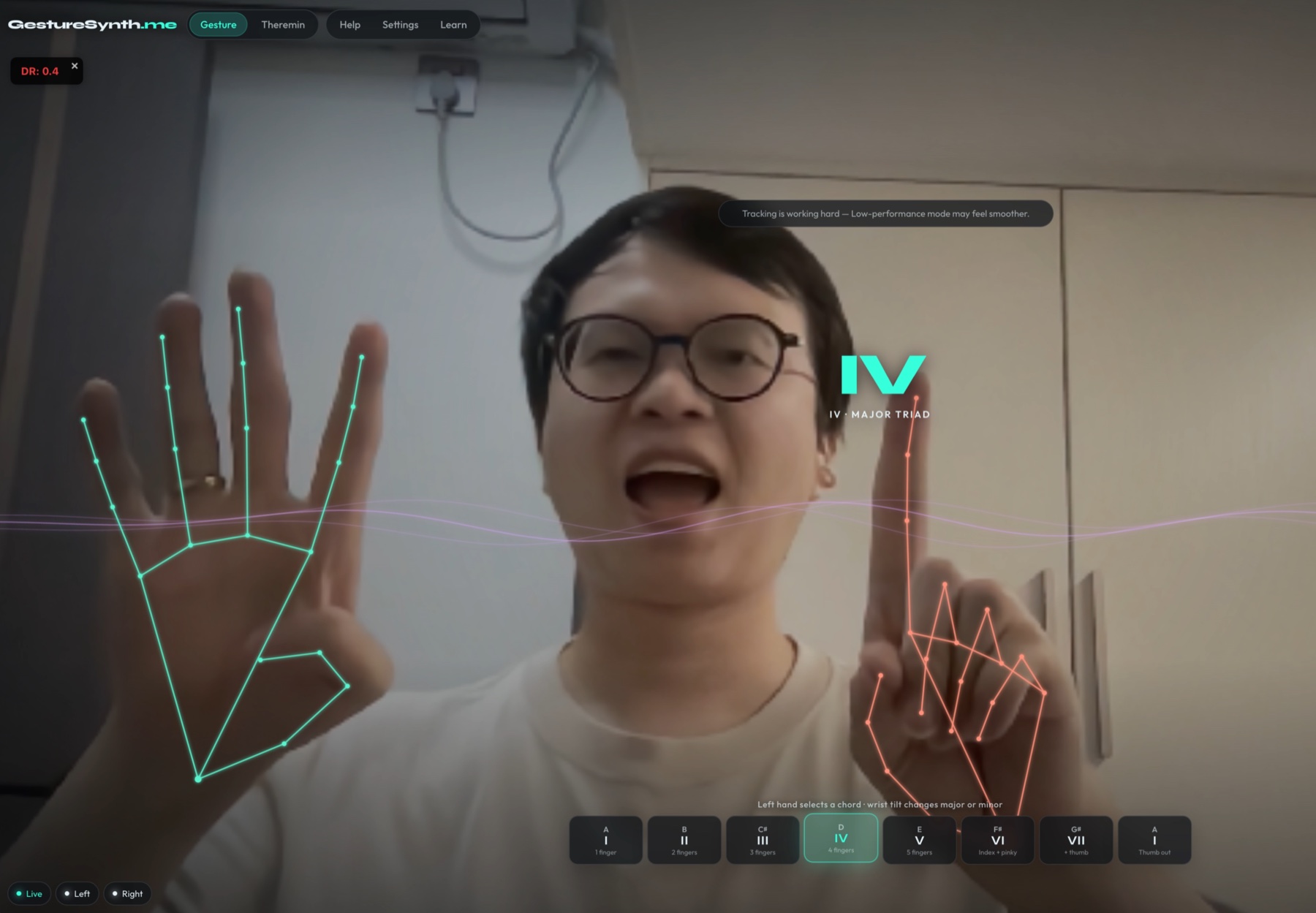
GestureSynth.me includes both approaches. In Theremin mode, the vertical position of the right hand controls continuous pitch and the left hand controls volume. The sound can glide between frequencies instead of snapping to a chord. In Gesture mode, the left hand selects scale degrees while the right hand selects harmony and changes volume, tone and octave. That mode is easier for structured chord progressions because the musical choices are quantized to defined harmonic targets.
The browser experience is therefore not a claim to reproduce the circuitry, antennas or technique of a physical theremin. It is a webcam-controlled synthesizer with a theremin-style performance mode. Players who want continuous pitch can use the online theremin page, while players who want repeatable harmony can stay in Gesture mode.
Play the online theremin → · Open the gesture chord player →
How the Browser Gesture Synth Works
After you select Start and grant camera permission, the browser reads a live video track. A hand-landmark model runs locally and estimates positions for fingers, wrists and palms. GestureSynth.me does not need to recognise a person's identity. It only needs enough geometric information to decide whether a hand is present, how many fingers are raised, where the hand is in the frame and how the wrist is angled.
The application converts those observations into stable musical controls. Short smoothing windows reduce sudden jumps caused by camera noise, and a small lost-frame tolerance prevents sound from cutting out whenever a fingertip is briefly hidden. The interface shows detection status and the currently interpreted chord or frequency, so the player can correct a shape rather than guessing what the system heard.
The sound itself is created with the browser's Web Audio capabilities. Oscillators, filters and gain controls respond to the mapped gesture values. There is no microphone recording in this signal path: the camera supplies movement input and the browser synthesizer supplies audio output. When a loop is exported, the arrangement is rendered locally into an audio file for download.
From hand landmarks to harmony
In Gesture mode, raised fingers on the left hand select degrees I through V, while two additional shapes reach degrees VI and VII. The right hand selects a triad, inversion or seventh-chord variation. Its height controls volume, wrist angle changes filter brightness and thumb position can lower the harmony by an octave.
The same shapes keep their control meaning when the musical key changes. The synthesizer recalculates the resulting notes, allowing a player to practise the movement vocabulary separately from a particular key signature.
What You Can Play With GestureSynth.me
The fastest way to understand the instrument is to play it. Gesture mode supports chord progressions, inversions, seventh chords and expressive changes from two coordinated hands. Theremin mode supports continuous melodies and pitch slides. Neither mode requires a MIDI keyboard, and both expose the detected control values on screen so a first-time player can connect a movement with its musical result.
A four-track loop sequencer turns short gestures into an arrangement. Players can choose tempo, measures and time signature, record after a count-in, edit individual steps, mute or solo tracks and export the result. The sequencer is useful for building a progression slowly: record one layer, listen to the repeat, then add another part without needing to hold every gesture at once.
The local practice library provides guided targets for public-domain melodies and focused chord studies. Each event identifies the expected scale degree, chord quality and octave. Progress feedback helps a player hold a clear shape before moving forward. These exercises are not a replacement for formal music instruction; they are a practical way to learn the site's gesture vocabulary and hear how repeated harmonic targets form a song.
Follow the gesture synth tutorial → · Practise songs with hand gestures → · Build a gesture music loop →
No Microphone or Video Upload Needed
Camera access can feel more sensitive than an ordinary button or keyboard input, so the boundary is explicit. GestureSynth.me asks for camera permission only after the player selects Start. The requested video track is used inside the browser for hand-landmark detection. The site does not request microphone permission, does not create a webcam recording and does not send camera frames to our application server.
Selecting Stop session releases the active camera track. A player can also revoke permission from the browser's site controls. Preferences such as the selected key, tutorial completion and sequencer visibility may be stored in local browser storage so they remain available on the next visit. Exported loops are generated as local downloads rather than stored in an account.
The current site does not load Google Analytics or an advertising tag. Cloudflare still receives the ordinary request information needed to deliver and protect the public pages and may add its privacy-focused Web Analytics performance beacon; the privacy-enhanced YouTube demonstration may contact Google when it loads or plays. These services are separate from the hand-tracking pipeline and do not receive camera frames, hand landmarks, generated music or private performance content from GestureSynth.me.
What You Need to Use a Gesture Synth
Use a current browser with camera, WebAssembly and Web Audio support. Recent desktop versions of Chrome and Edge are the primary supported environment, and Chrome on Android can be used in a landscape layout. Browser and device capabilities vary, so older phones or privacy-restricted embedded browsers may not provide the complete experience.
Good tracking depends more on the camera scene than on expensive equipment. Use soft light from the front, avoid a bright window behind you and keep both wrists and fingertips inside the frame. Stand approximately one arm's length from the camera and avoid placing one hand directly in front of the other. A plain background that contrasts with the hands also helps the model maintain stable landmarks.
If movement feels delayed, close unnecessary tabs, reduce other camera or graphics workloads and enable the instrument's low-performance mode. If there is no sound, check that the tab and system output are not muted, raise the master volume carefully and interact with Start again so the browser can resume its audio context. Dedicated camera and latency guides provide step-by-step recovery checks.
Set up webcam hand tracking → · Reduce gesture synth lag → · Fix gesture synth sound →
About GestureSynth.me
GestureSynth.me is an independently implemented browser instrument built around hand tracking, Web Audio synthesis, guided practice and local loop creation. It is designed to make gesture-controlled music understandable before asking a visitor to buy hardware or install specialist software. The visible controls, reference guides and troubleshooting pages document the instrument's actual behaviour rather than presenting gesture music as a visual effect alone.
The product is not an official hardware synthesizer, MIDI controller, recording service or therapy tool. It does not claim affiliation with another gesture-music product that uses a similar descriptive phrase. The GestureSynth.me name identifies this site's interface, content and browser implementation.
The project will be improved through observed usability problems and search questions that reveal a real task: learning a control, resolving a camera issue, understanding latency or practising a chord. Feedback should include the browser, operating system and a reproducible description, but never a private camera recording, password or verification code.
Who Builds and Maintains the Site
GestureSynth.me is an independent, self-funded web project rather than a product page operated by Google, MediaPipe, YouTube or a hardware manufacturer. The same site operator maintains the browser instrument, writes and reviews the instructional pages, tests the published routes and responds to support messages at lisheng3698@gmail.com. There is no sponsored editorial team and no advertiser decides which songs, controls or troubleshooting steps are documented.
A guide is published only when it corresponds to a working feature or a reproducible practice route in the instrument. Song pages describe original hand-control exercises based on public-domain or classical material rather than copying lyrics, recordings or commercial arrangements. Technical claims about camera, audio and storage are checked against the implementation, and material changes are reflected in the Privacy Policy or Terms when they affect a visitor's choices.
If a page is unclear or a control behaves differently from its description, use the Contact page to report the exact URL, browser and steps. Corrections are evaluated against the live product and updated without charging for access or requiring an account.
Contact the site operator → · Review camera and advertising privacy →
See the Gesture Synth in Action
The short demonstration below shows the relationship between visible hand positions and the browser instrument. Use it to understand the basic playing space, then open the live instrument and try one control at a time. Begin with a clear left-hand degree, wait for the indicator to stabilise, and add the right hand only after the first shape is recognised.
Playing is the functional answer to the question “what is a gesture synth?” The definition describes the pipeline, but the instrument makes the mapping tangible: movement becomes a musical decision that can be repeated, changed and combined with another hand.
Play the free gesture synth now → · Learn every hand control →
Understand the instrument
Gesture Synth Questions
What does a gesture synth do?
It maps physical movement to musical parameters. On GestureSynth.me, webcam hand landmarks select chords, harmony, volume, filter tone, octave or continuous theremin-style pitch, and the browser generates the sound.
Is a gesture synth the same as a theremin?
Not exactly. A theremin is a specific contact-free electronic instrument with continuous pitch and volume antennas. A gesture synth can use many sensors and mappings. GestureSynth.me includes a theremin-style mode as well as a separate chord-based Gesture mode.
Does GestureSynth.me need special hardware?
No specialist controller is required. A compatible browser, webcam and audio output are enough. Soft front lighting and enough space to keep both hands visible improve tracking.
Is GestureSynth.me free?
Yes. The browser instrument, chord and theremin modes, loop sequencer and local practice songs can be used without creating an account or purchasing a subscription.
Does the site record my camera or microphone?
The instrument does not request microphone permission and does not create or upload a webcam recording. Camera frames are processed locally for hand-landmark detection, and stopping the session releases the camera track.
Can I save music made with hand gestures?
The four-track sequencer can render the current arrangement as a local WAV download, with a WebM fallback in browsers that cannot use the required offline audio rendering.